Personal Execution System / 01
early accessEarn the day.
One private system for your calendar, tasks, training, nutrition, money, and notes. Plan tonight. Execute tomorrow. 14 days free — no credit card.
14 days free · No credit card · Cancel in one click

The loop / 02
The day, in order.
A system should cut decisions, not add them. PES keeps the plan next to the work.
- 01PlanCALENDAR → TASKS
Give work a place in time. Schedule and task queue, side by side.
- 02ExecuteTODAY → DONE
Open Today and run the sequence. Fewer switches. Clearer next moves.
- 03ReviewNOTES → NEXT DAY
See what got done. Shape tomorrow before it starts.
Structure isn’t restriction. It’s speed.
Every unscheduled hour gets spent twice — once deciding, once doing. Put tomorrow on the timeline tonight, and the morning starts in motion: the schedule, the task queue, and the training block already in order, on one screen.
 The day is won before sunrise
The system / 03
Six apps you pay for. One that replaces them.
A calendar, a to-do list, a workout tracker, a macro counter, a budget app, a notebook — you already run a system; it’s just scattered across subscriptions that don’t talk. PES runs the whole day in one place, for less than two of them.
- 01Today
Open one screen and know your next move — now, next, done. No morning triage.
- 02Calendar
Every commitment gets a time slot, so work stops colliding and nothing slips.
- 03Tasks
Capture anything in seconds; the AI planner drops it into a real gap in your week.
- 04Workouts
Walk into the gym knowing exactly what to lift. Progress logged, streaks kept honest.
- 05Nutrition
Hit protein and calories without a second app — quick logs, barcode scans, a weekly verdict.
- 06Finances
Every account, every subscription, one honest net number — no spreadsheet night required.
- 07Notes
Decisions and ideas land next to the day they belong to — findable when it matters.
- FoundationPrepare the person before the work.
- Focused workPriority task / protected time.
- ResetNutrition / notes / next block.
- TrainingWorkout in the context of the day.
- CloseReview today. Protect tomorrow.
ONE SEQUENCE / LESS FRICTION
The planner / 04
Say it. It’s scheduled.
Capture a task in two keystrokes — or share it straight from your phone. The AI planner reads your calendar, sizes the work, and places it in a real gap. The list empties itself into your week.
- Quick capture from any screen, even the share sheet
- Estimates and energy levels, learned from how you work
- Re-plan from now when the day goes sideways

Training / 05
Your program, already loaded.
Pick a strength or running program and the sessions land on your calendar. Walk in, see today’s lifts, log it in seconds — with runs, rides, and GPX imports tracked down to splits and PRs.
- Programs with clear progression, scheduled for you
- Route maps, splits, and best efforts for endurance work
- Honest streaks — travel days skip, they don’t lie

Fuel / 06
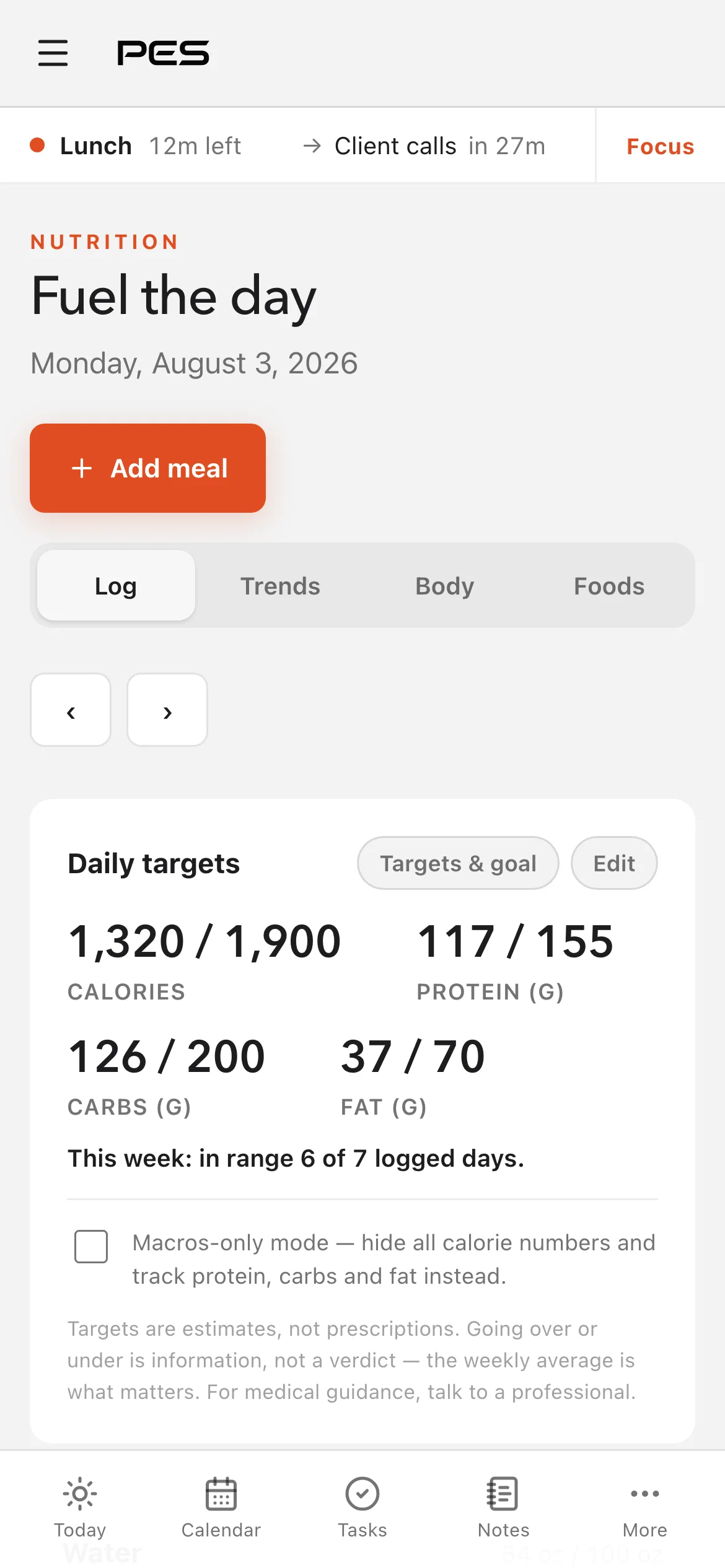
Log it in seconds. Fuel the work.
Barcode scan, verified food search, one-tap water, re-log yesterday’s lunch. Targets sit beside your training, and the week gets a verdict — not a guilt trip.
- Barcode scans and USDA-verified foods
- Calories, protein, carbs, fat, and water at a glance
- A weekly in-range verdict that keeps you consistent
Money / 07
Every dollar, one honest number.
Accounts, budgets, and subscriptions live next to your time. Net worth over time, spending by category, price-hike flags on recurring charges — no spreadsheet night required.
- Net worth tracked across every account
- A subscription detector that flags price changes
- Read-only bank sync — connect your bank, PES can never move money

The close / 08
See the week you actually lived.
Close each day in sixty seconds. PES turns your logs into a weekly scoreboard — days closed, focus hit, sessions trained, meals logged — and at year’s end, your own Wrapped.
- A 60-second shutdown ritual
- Weekly and monthly scoreboards
- Your year, Wrapped — worth sharing

Everywhere the day happens / 09
Plan at the desk. Execute anywhere.
The full workspace lives on the big screen — the day rides along in your pocket. Check the next block, log the meal, capture the task the second it lands.
- 01Plan on your Mac
The whole week laid out, tasks placed, blocks protected.
- 02Run the day from your iPhone
Now, next, and quick logging — built for one thumb.
- 03Capture before it slips
A thought becomes a task in seconds, from either screen.


Private by design / 10
Your system should belong to you.
PES is built around account-level data isolation, verified sign-in, and encrypted connections. The public site you are reading has no analytics, sign-in code, database connection, or user-data collection.
- 01Per-account isolation
Database access rules scope personal records to the signed-in account.
- 02Verified access
Passwordless email sign-in avoids stored app passwords and confirms account ownership.
- 03Bounded promises
No connected service is impossible to attack. PES documents its controls and keeps improving them.
Pricing / 11
One plan. Everything in it.
Pro
$17per month, billed yearly (USD)
One plan for busy professionals.
- Unlimited usage
- AI planner & smart capture
- Calendar, tasks, workouts, nutrition & money
- Google Calendar sync
- 14 days free — no credit card
$22 per month billed monthly — or build your own from $10/month base + $4/module
Enterprise
Contact us
For enterprises with custom security, compliance, integration and billing needs.
- SSO & SAML
- SCIM + Audit Logs
- Custom privacy and data requirements
Pricing FAQ / 12
The money questions, answered.
Straight answers, no fine print. Everything else lives in the Help Center.
01How does the free trial work?
Sign up and you get 14 days of the full product — every module, nothing held back. No credit card required. If PES isn’t for you, walk away: there’s nothing to cancel and you won’t be charged.
02What does PES cost after the trial?
Build your own stack: the base platform (Today, Calendar, Tasks, Notes, and the AI planner) is $10/month, and each module — Workouts, Nutrition, Finances — is $4/month. Everything together is $22/month, or $17/month billed yearly ($204/year, all modules included).
03Why is there only one plan?
Because the system only works whole. Carving the calendar away from tasks, or training away from the plan, to make a cheaper tier would break the thing you’re paying for. One plan, priced for people who intend to use it.
04Can I cancel anytime?
Yes — one click. Open Manage billing in Settings to reach the Stripe customer portal and cancel there. No email, no retention call. Your access continues to the end of the period you’ve paid for.
05How do refunds work?
Automatically. Cancel within 14 days of a monthly signup — or within 30 days of a yearly one — and your payment is refunded in full, no email required. Past those windows, cancelling keeps your access until the end of the period you paid for. If anything ever looks wrong, write to support@example.com and we’ll make it right.
06Can I switch between monthly and yearly?
Yes, in the same Stripe portal. Stripe prorates the difference automatically, so switching mid-cycle doesn’t cost you anything extra.
07What payment methods do you accept?
All major credit and debit cards. Payments are processed by Stripe — PES never sees or stores your card number.
08Where do I find my invoices?
In the Stripe customer portal — Manage billing in Settings. Every invoice and receipt lives there, ready to download.
09What happens if a payment fails?
Stripe retries the charge automatically and emails you along the way. If it keeps failing, your account locks to the paywall — your data stays put the whole time and export is always available. Fix the card and you’re back in.
10Does PES have team plans or seats?
PES is a personal execution system — one person, one private system. The one exception is by design: a Household lets you and a partner share the finances you each explicitly choose — shared accounts, a joint budget, joint goals — while everything else stays private. There are no business teams, seats, or member roles.
11How does the AI planner handle my data?
12Can I expense PES?
Worth a try. You’d be expensing the thing that keeps your calendar honest, your training logged, and your follow-through visible — managers have approved worse. Either way, a clean invoice is waiting in the Stripe portal.
Something else on your mind? Write to support@example.com — you’ll get an answer from a person.

PES / Personal Execution System
Plan it. Place it.Execute it.
14 days free, no credit card. No app store, no downloads—open it and go.
Try for free